Showing posts with label Coding in Libraries. Show all posts

Thursday, November 5, 2015

Code in Libraries: Squishy Circuits

Author name: Tammy L. Gantz
Library System: Washington County Free Library
Date of program: 09/17/2015

Description of Activities:

  • Explored electricity using LEDs, a battery, playdoh and clay.
  • Children learned about series circuits and parallel circuits.
  • Two adults and five children attended

Scratch Programming

Author name: Tammy Gantz
Library System: Washington County Free Library
Date of program: 10/21/2015

Description of Activities:
Used the Scratch program that was on the laptops and walked the students through Getting started with Scratch from the Scratch user's guide. The students wrote code to make scratch dance, added sound effects and changed the background. The students were then given time to design their own program. This program was held Oct. 21 for the children and Oct. 22 for the teens.

Code in Libraries: STEM Kids: Electrical Circuits

Author name: Julie Iden
Library System: Ruth Enlow Library of Garrett County
Date of program: 09/16/2015
Title of Program: STEM Kids- Electrical Circuits

Description of Activities:
I started off the program with a power point presentation on electrical circuits. We discussed electricity, conductors, insulators, the flow of electricity through a circuit, series circuits, and parallel circuits. We used an energy ball to demonstrate electrical circuits. This was not included in our coding kits, but it would make a nice addition to your kit. When you touch the ball's metal strips, the ball lights up and creates sound. We made predictions on whether or not electricity would flow through the human body. We kept adding kids to our human circuit until all fourteen kids were
included in our circuit. If someone broke the connection by letting go of their hands, the ball would stop lighting up and making sounds.

We then divided into two groups. Half of the kids worked independently using the Snap Circuits Jr's. I purchased additional Snap Circuits Jr. kits, so we have a total of five. The children worked in groups of two, and that worked out well. They enjoyed working through the projects in the project guide that came in each Snap Circuits Jr. kit. Some of the older children skipped ahead to more challenging projects. Each group was successful in completing circuits to make lights and sounds and even a flying saucer.

I worked with the other half of the group making squishy circuits. They were able to complete both series and parallel circuits. We had trouble with a few LED's burning up. We were told not to attach the LED's directly to the batteries, and I think that that the LED wires were touching the wires coming from the batteries inside of the play dough. My son said that we needed resistors, but I'm not sure how that would work.

STEM Kids is an hour and a half long, once a month program for children ages 6-13 at the Ruth Enlow Library in Oakland. By using the squishy circuits and the Snap Circuits Jr's. from the coding kit, the children were able to learn a lot about electrical circuits. They were given the opportunity to create many different circuits using several different materials. I liked that they were able to make their own discoveries using the provided materials. The program worked well for both the younger and the older children.

Event Photos: http://www.wmrl.info/sites/default/files/webform/IMG_3325.jpg

Thursday, September 3, 2015

Coding in Libraries Sharing at Branch Meeting

Authors' names: Tammy Gantz and Jennifer Ross
Library System: Washington County Free Library
Date of program: 08/31/2015

Description of Activities:

Jennifer Ross and I presented the Coding in Libraries box to branch employees. We gave a quick overview of the items available in the box and then presented Squishy Circuits in detail. We showed the branch members what a program with Squishy Circuits might look like. They used the LEDs, batteries, play doh and clay. They created a series circuit and a parallel circuit. We also talked about electricity safety. Hopefully branch members will offer this program at their branches.

Digi-Spaces-Coding with the Raspberry Pi

Author name: Cyndi Powell
Library System: Washington County Free Library
Date of program: 08/13/2015

Digi-Spaces-Coding with the Raspberry Pi

Description of Activities: 

At the start of the program, I explained what a Raspberry Pi is and gave examples of what it is used for and the types of things that it is capable of being turned into. For example, how security system, used by hobbyists and inventors, micro-computer...these were some of the things I talked about. I showed the teens the different plug-ins and hooked it up to a keyboard, mouse and projector screen.

Most of the program was an introduction to coding with the program Python, which is already pre-loaded on the Raspberry Pi. I followed an activity found in the book called "Raspberry Pi Projects" by Andrew Robinson from Chapter 2 called "Generating an Insult". I found this to be a good introductory project because the coding language was simple and it was a short series of commands. I led them through the project, typing in the code, showing them how the program worked, talking about the different commands, the different screens and how the program can easily be modified.

Then I gave them a project to follow that I found in a book called "Help your kids with computer coding : a unique step-by-step visual guide, from binary code to building games" by Carol Vorderman. We followed Program #4 "Ghost Game". I let the teens follow the instructions for writing the code. We ran their program and played the game. Then we looked further through the second book at the explanations of what it is we did when we wrote the coding. This book is a great resource and explains everything in a clear, user friendly language and it's a visual guide which is great too!

The last 10-15 minutes of the program, the teens were experimenting and modifying the Ghost Game
program. Adding more doors, ghosts and commands. It was great to see them apply the knowledge they had learned from the exercises we did and start to explore the different
possibilities in coding!

Wednesday, May 6, 2015

Code in the Libraries: Coding Kits

Author Name: Jennifer Ross
Library System: Washington County Free Library

Top 3 things learned:

  • Teaching Circuits, like the "Squishy Circuits" we made out of Play Dough and 9 volt batteries and LED lights, is a great way to help children grasp the logic and concepts behind computer code.
  • There are a lot of games to help kids grasp coding as Blocks of Coding Language.
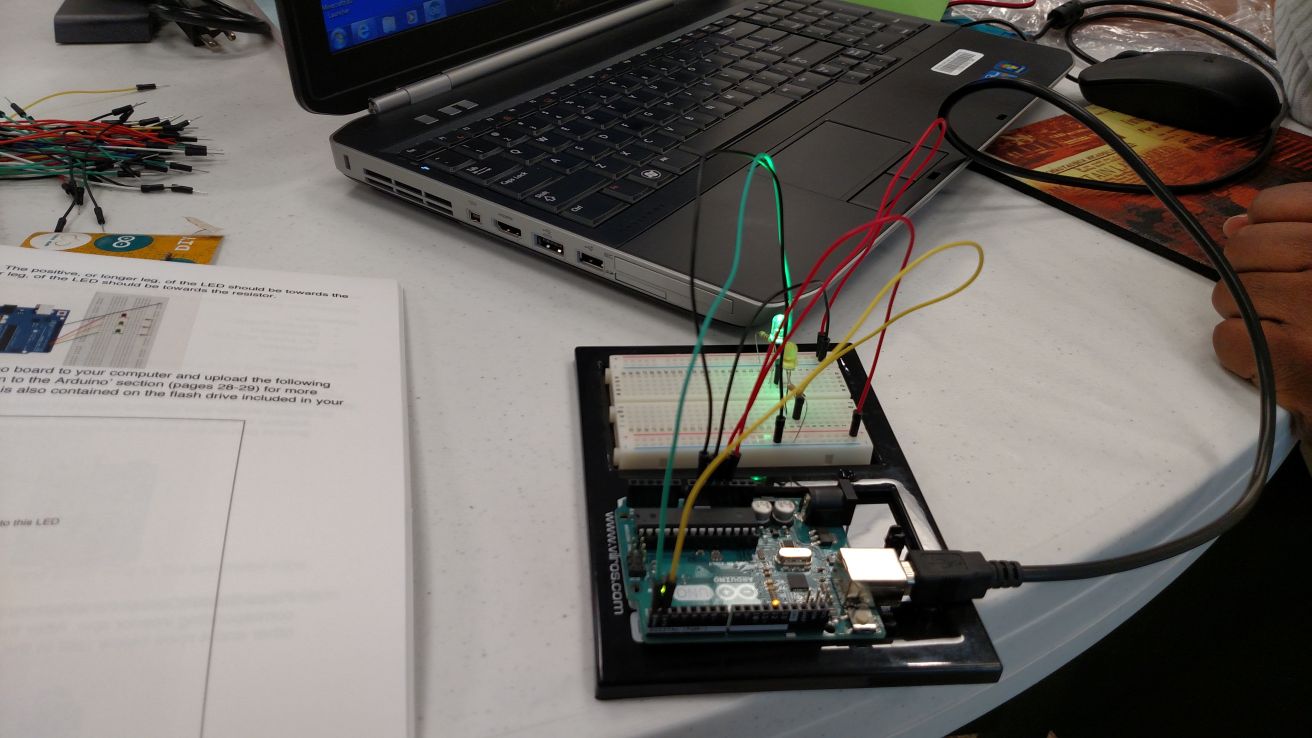
  • Having mini-computers, like the Arduino, make it easier to understand the working "guts" of the computers, which also help kids learn to code.

How to implement: 
We will definitely be offering some of the coding programming at our library soon, like the LED and conductive thread bookmarks and some more of the great coding resources.

Additional learning: 
Can't wait to get more time playing around with the Arduino.

Reflection Image:
http://www.wmrl.info/sites/default/files/webform/code%20in%20the%20library%202.jpg

Code in the Libraries: Coding Kits

Author Name: Tammy L. Gantz
Library System: Washington County Free Library

Top 3 things learned:

  • Learned how to create a squishy circuit and a parallel circuit.
  • Looked at different block based programming languages such as scratch.
  • Programmed an arduino to switch and LED on and off.
  • Learned how to set up a Raspberry Pie.

How to implement: 
All of these ideas could lead to library programs and classes for all ages.

Additional learning: 
This class was very technical. More training in these areas would be needed before I would be comfortable leading a class in these areas.

Code in the Libraries: Coding Kits

Author Name: Adryana Billotti
Library System: Washington County Free Library

Top 3 things learned:

  • How to set up and run a computer using a raspberry pi
  • How to make a squishy circuit
  • Simple coding that was used to make LED lights turn on and off

How to implement: 
I hope to begin planning upcoming programs that use coding and different circuitry tools to teach kids and teens the same things that I learned in the program.

Additional learning: 
I would like another class that provides program ideas that can be done with these different tools that we gained a basic understanding of. Now that I have a basic understanding and idea of how to use the tools, I would like to create a list of program possibilities.